ErgoFoundry is reader-supported. When you buy through our links, we may earn a commission at no extra cost to you. We test and research every product we recommend.
The Problem: Standing Desks Without Mats
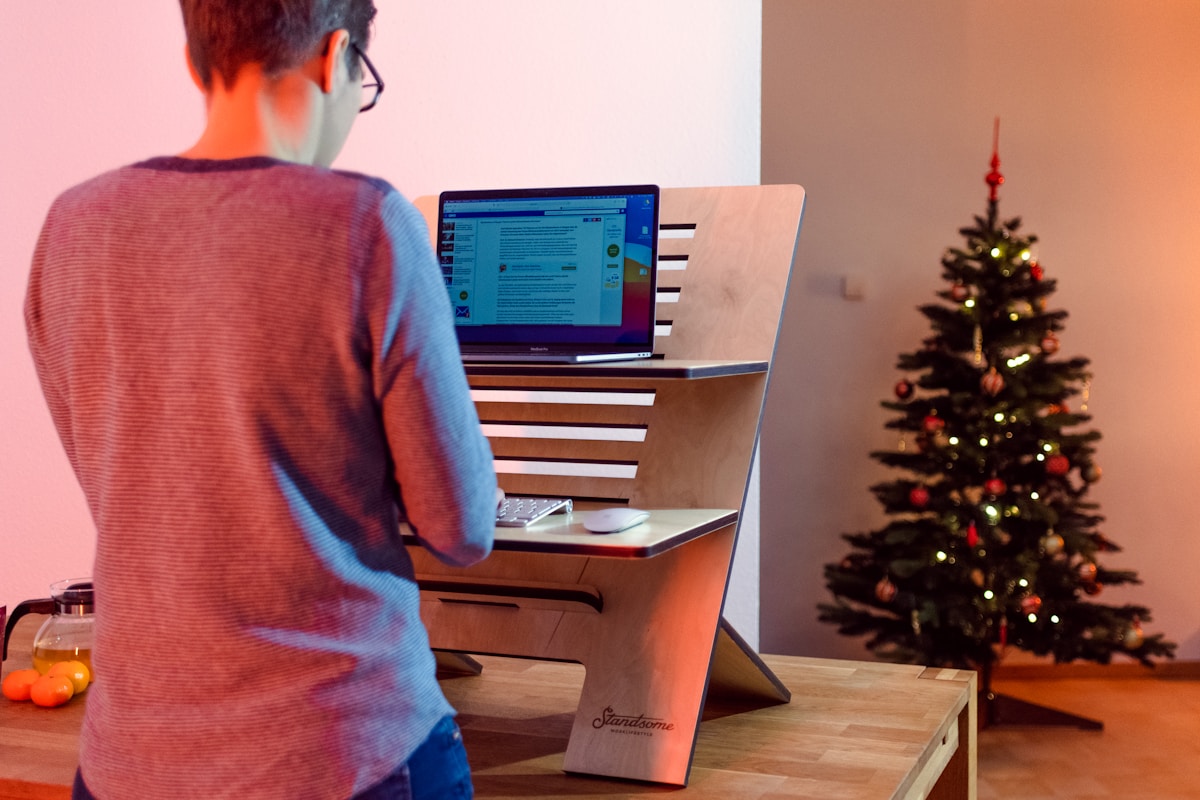
You bought the standing desk. You assembled it. You raised it to standing height for the first time, felt virtuous, and then — about 20 minutes in — you started to feel it. The balls of your feet aching. A dull pressure building in your heels. You shifted your weight from foot to foot, then leaned on the desk, then lowered the desk back to sitting height and didn't raise it again for the rest of the day.
This is the universal experience of standing on a hard floor without a mat. Hardwood, tile, laminate, even thin carpet over concrete — all of them concentrate your body weight onto small contact points on your feet. Your feet have roughly 26 bones, 33 joints, and over 100 muscles and ligaments. Standing on a hard, unyielding surface compresses all of that against something that doesn't give back.
The result isn't just sore feet. When your feet hurt, you compensate. You shift your weight unevenly, which tilts your pelvis, which curves your spine, which tenses your shoulders. The "standing lean" — where you prop yourself against the desk with your forearms — is your body's way of redistributing pressure away from your feet. It also rounds your shoulders forward, compresses your lower back, and undoes most of the postural benefit you bought the standing desk for. The irony: a standing desk used without a mat can create the same poor posture it was meant to fix.
Why don't shoes solve it? Most people working from home stand barefoot, in socks, or in slippers. Even if you wear shoes, most indoor footwear doesn't have the cushioning or arch support to meaningfully reduce standing fatigue over 30+ minutes. And wearing outdoor shoes inside is a non-starter for most people. The mat is the simpler solution.
The Science: Do Anti-Fatigue Mats Actually Work?
"Anti-fatigue" sounds like marketing jargon, but there's genuine biomechanics behind it — and the research predates standing desks by decades.
The concept originated in industrial settings: factories, assembly lines, and commercial kitchens where workers stand on concrete for 8-12 hours. Anti-fatigue mats were introduced to reduce lower-limb disorders and fatigue in these environments. The mechanism is straightforward: a compliant (yielding) surface encourages subtle, subconscious muscle engagement in your calves and feet. These micro-movements promote blood circulation through the lower legs — your calf muscles act as a "second heart," pumping blood back up toward your torso. On a hard floor, you stand relatively still, blood pools, and fatigue sets in faster. On a mat, the slight instability triggers continuous small adjustments, keeping blood moving and delaying the onset of discomfort.
A 2013 systematic review in the International Journal of Industrial Ergonomics examined anti-fatigue mat interventions in industrial workplaces and found consistent reductions in perceived fatigue and lower-limb discomfort. A 2021 study in Applied Ergonomics specifically examined standing desk mats (rather than industrial mats) and found that anti-fatigue mats reduced perceived discomfort by roughly 30-40% compared to standing on hard flooring for 60+ minute intervals.
What mats don't do: They don't fix back pain from poor posture. If you're standing with your hips tilted forward, your shoulders rounded, and your head craned forward, a mat won't correct that — it just makes your feet more comfortable while you do it. Mats address fatigue and lower-limb discomfort. Posture correction requires conscious effort, proper desk height, and correct monitor positioning. Confuse those two things and you'll be disappointed.
The calorie myth: Standing on a mat doesn't burn more calories than standing on a hard floor. The micro-movements are too small to affect metabolic rate meaningfully. A mat is a comfort tool, not a fitness tool.
The 15-30 minute window: Research and real-world experience both point to the same threshold: discomfort on a hard floor typically sets in around 15-20 minutes. On a good anti-fatigue mat, that window extends to roughly 45-60 minutes before noticeable discomfort begins. The mat doesn't eliminate fatigue — it buys you longer comfortable standing intervals. If you rarely stand for more than 15 minutes at a time, the practical difference is minimal.
Standing Desk Benefits: The Full Research Picture
Mats make standing more comfortable — but what does standing actually do for your health? Our deep dive analyzes 10+ years of clinical research on standing desks vs. sitting, separating what's proven from what's marketing.
Standing Desk vs Sitting: The Research →3 Signs You ACTUALLY Need a Standing Desk Mat
Not everyone needs a mat. Here's how to know if you do:
Sign 1: Foot, knee, or lower back discomfort within 20-30 minutes of standing
This is the clearest signal. If you feel aching in the balls of your feet, pressure in your heels, or a gradual creep of tension into your lower back within the first half hour of standing, your floor surface is transferring too much pressure back into your body. A mat will extend your comfortable standing window significantly.
Sign 2: You avoid standing because it's uncomfortable
Pay attention to your own behavior. When you reach for the desk controls, do you hesitate because you don't want to stand? Do you find yourself sitting through entire afternoons even though you told yourself you'd alternate? If discomfort is silently steering you away from using the standing function you paid for, a mat removes that friction. It makes standing the easy choice, not the uncomfortable one.
Sign 3: You constantly shift weight or lean on the desk while standing
Watch yourself (or ask someone to watch you) during a standing session. Are you propping yourself up on your elbows? Shifting from foot to foot every 30 seconds? Standing with one hip cocked? These are compensation behaviors — your body is trying to offload pressure from your feet. The "standing lean" in particular is self-defeating: it rounds your shoulders, compresses your low back, and puts you in exactly the posture you bought the standing desk to escape.
When you probably don't need one
If your standing intervals are consistently under 15 minutes, you stand on thick carpet with a padded underlay, or you genuinely don't experience any discomfort while standing, a mat's impact will be marginal. Don't buy one just because you feel like you're "supposed to." The honest answer is: some people are fine without one. If that's you, spend the $40-100 on something else.
Mat vs. Balance Board vs. Nothing — What's Worth Your Money
There's a growing category of "standing desk accessories" and it's worth understanding the differences before spending money:
Anti-Fatigue Mat
Best for: Sustained focused work while standing — writing, coding, spreadsheet work, anything that requires concentration and a stable stance. Mats are passive — you stand on them and they do the work. No learning curve, no conscious engagement required.
Typical cost: $30-100 for a quality mat. Budget options at $30-40 are surprisingly good. Premium options at $90-100 offer more features (textured terrain, beveled edges, thicker cushion).
Balance Board
Best for: Active standing — calls, meetings, brainstorming, any activity where you don't need fine motor control. Balance boards engage your core, improve ankle mobility, and satisfy the urge to fidget. They keep you moving, which is genuinely good for you.
Typical cost: $80-150 for a good balance board. The FluidStance Level ($100-130) is the category leader. Cheaper knockoffs exist but the build quality and tilt mechanism vary significantly.
The trade-off: You can't type accurately on a balance board. It's for calls and passive tasks, not precision work. Some people use both — mat for deep work, board for meetings.
Nothing (Socks on Carpet)
Best for: Very short standing intervals (<15 minutes), thick padded carpet, or people who genuinely don't experience discomfort. If you're a "stand for 5 minutes between meetings" person rather than a "stand for 2 hours of deep work" person, you might not need anything.
The Combo Approach
The strongest setup for people who stand a lot: anti-fatigue mat for focused work sessions, balance board for calls and casual tasks. Combined cost ~$130-230. Not essential on day one — start with a mat and add a board later if you want more active standing options.
The 5 Best Standing Desk Mats — Tested & Reviewed
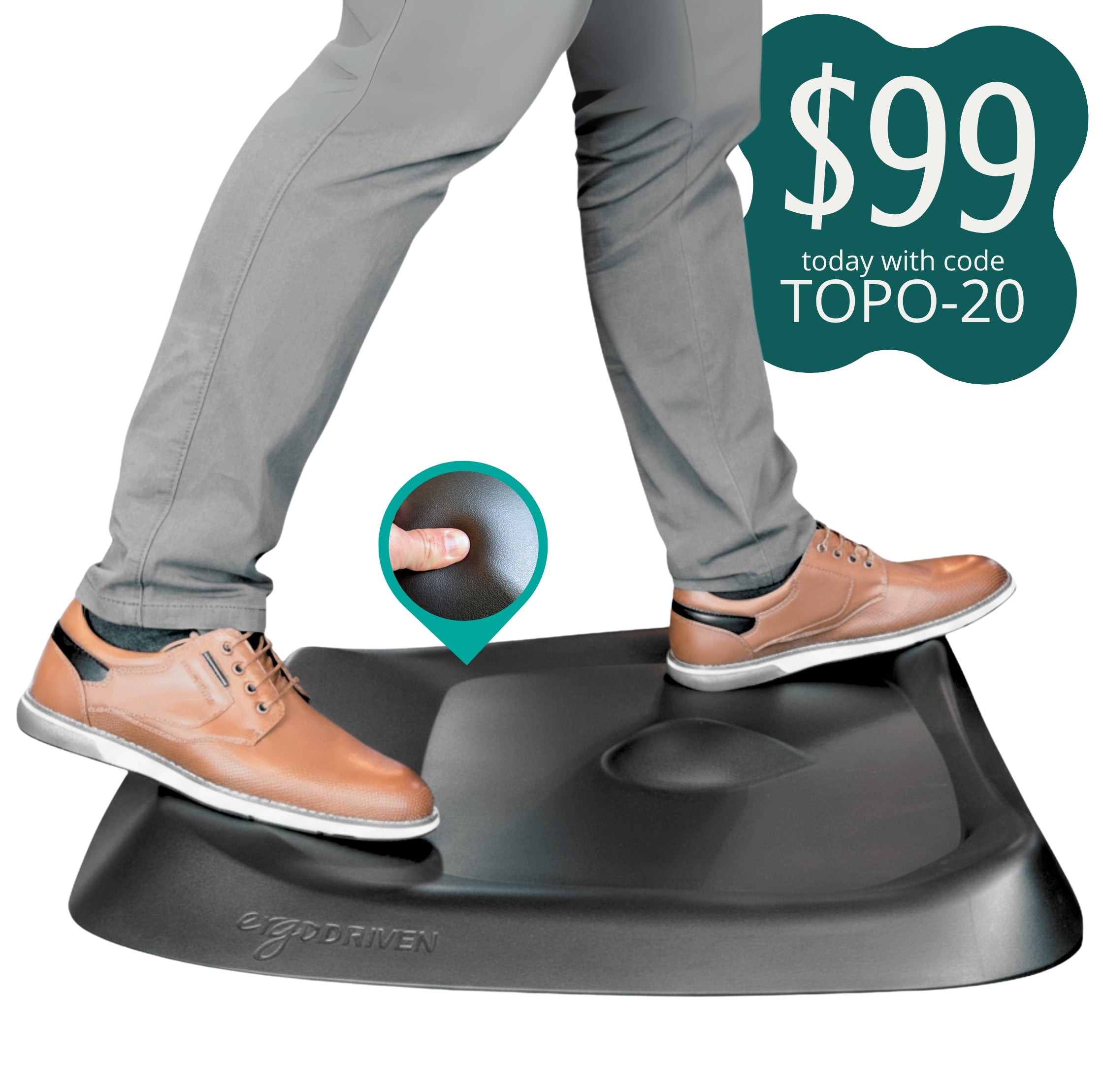
1. Ergodriven Topo Comfort Mat — Best Overall ($99)
The Topo is the category-defining product. Ergodriven built it specifically for standing desks (not repurposed from commercial kitchens) and it shows in the design. The mat surface isn't flat — it features varied terrain with a raised teardrop-shaped section at the front, a lower central platform, and a subtle ridge toward the back. This isn't a gimmick. The terrain encourages you to shift your stance naturally — one foot on the teardrop, both feet on the flat section, standing with feet at different heights — which promotes the micro-movements that fight fatigue.
Specs: 26.25" × 29" × 2.5" thick. The teardrop calf-stretch feature is genuinely useful — you can place one foot on it to stretch your calf and Achilles tendon while you work. 7-year warranty. Phthalate-free polyurethane foam. Weight: ~7 lbs. Doesn't slide on any surface.
Why it's #1: The Topo was purpose-built for standing desk use, and no competitor has matched the thoughtfulness of the terrain design. The size is right for a single-person workstation (wide enough for shoulder-width stance, not so large it becomes a tripping hazard or dominates the room). The 7-year warranty is class-leading.
Drawbacks: The textured surface isn't for everyone — some people find it distracting under bare feet. At $99, it's the most expensive mat on this list by a wide margin. The raised teardrop section means you can't use the full surface area uniformly (though you adapt within a few days). It's only available in black.
2. Imprint Cumulus Pro — Best for All-Day Standing ($66)
If you stand for hours at a stretch — the kind of user who raises the desk at 9 AM and doesn't lower it until lunch — the Cumulus Pro is designed for you. It's thicker than most mats, with a 97% thicker cushion core compared to standard Imprint mats, and it's certified by the National Floor Safety Institute for slip resistance.
Specs: 24" × 36" or 24" × 70" (longer option for wider standing zones). 0.75" thick. Lifetime guarantee (one of the only standing desk mats with a lifetime warranty). Endorsed by the American Chiropractic Association. Beveled edges on all four sides to prevent tripping.
Why it's the all-day pick: The cushion density is tuned for extended standing — it's firm enough that you don't sink, compliant enough to reduce pressure. The lifetime guarantee means Imprint stands behind it long-term. The longer 70" version is useful for large workstations where you might pace or shift laterally while working.
Drawbacks: Plain flat surface — no terrain features, no movement-encouraging contours. It's a traditional mat design, just well-executed. The 24" width is functional but narrower than the Topo. No calf-stretch feature. The flat design means you're more likely to stand still, which somewhat undermines the anti-fatigue mechanism.
3. Gorilla Grip Original — Best Budget (~$37)
The Gorilla Grip is the surprise of the category — a $37 mat that competes with options costing 2-3x more. It's originally marketed as a kitchen mat, but its specs translate perfectly to standing desk use: phthalate-free foam, beveled edges, non-slip bottom, and a 10-year guarantee.
Specs: 24" × 36" (most common size; also available in 24"×70", 17"×24", and others). 0.75" thick. Textured top surface for grip. Beveled edges. 10-year guarantee. Phthalate-free, non-toxic foam. Available in multiple colors (the dark gray or black are most office-appropriate).
Why it's the budget winner: At $37 for the 24"×36" size, the Gorilla Grip is less than half the price of the Topo and almost half the Cumulus Pro, with a 10-year guarantee that's longer than almost any competitor. The foam is genuinely comfortable — not as sophisticated as the Topo's terrain design, but for straightforward cushioning it performs far above its price. The beveled edges are well-designed — you won't trip on them.
Drawbacks: Thinner than the Topo and Cumulus Pro — you'll feel the floor through it sooner during extended standing (roughly 45-60 minutes vs. 60-90 for the Topo). No terrain features — just a flat cushion. The textured pattern is decorative, not functional — it doesn't encourage movement like the Topo's varied surface. Over 2-3 years of heavy daily use, the foam compresses noticeably.
4. Sky Solutions Anti-Fatigue Mat — Best Variety (~$40)
Sky Solutions makes a straightforward, well-executed anti-fatigue mat with more color and size options than anyone else. If you care about how your mat looks — or need a specific size that other brands don't offer — this is your pick.
Specs: 24" × 36" or 24" × 70". 0.75" thick. 9 color options (including wood-grain patterns that blend with hardwood floors). Lifetime replacement promise. Anti-curl edges that actually stay flat (a common complaint with cheaper mats is curling corners). Commercial-grade foam.
Why it stands out: The variety — colors, sizes, patterns — means you can match your mat to your office rather than just accepting black. The anti-curl edges work; this is one of the few budget mats that ships flat and stays flat. The foam density is comparable to the Gorilla Grip. Lifetime replacement promise gives long-term confidence.
Drawbacks: Some users report an initial rubber/chemical smell that takes 2-3 days to dissipate (air it out before using). No terrain features — flat foam like the Gorilla Grip. The 24"×36" size is the same as competitors but the effective standing area feels slightly smaller due to the edge design. At ~$40, it's functionally equivalent to the Gorilla Grip but $3 more expensive with a better warranty.
5. AmazonBasics Premium Anti-Fatigue Mat — Best Ultra-Budget (~$30)
The cheapest mat that's worth buying. The AmazonBasics Premium is Amazon's house-brand entry into the category, and it's exactly what you'd expect: basic, functional, no surprises.
Specs: 24" × 36". Approximately 0.5" thick (thinner than all competitors above). Beveled edges. Non-slip bottom. Black only. No published warranty (standard Amazon return policy applies).
Who this is for: Someone who wants to try a mat without committing much money. A starter mat to test whether a mat makes a difference for you. A temporary setup or a secondary standing station (garage, workshop, secondary desk).
Drawbacks: The least durable mat on this list — the foam compresses noticeably within 6-12 months of daily use. At 0.5" thick, it provides the least cushioning — you'll feel the floor through it sooner than any competitor. No warranty to speak of. The edges, while beveled, are less refined — more likely to catch a foot or curl over time.
Verdict: Spend the extra $7 for the Gorilla Grip or Sky Solutions. The AmazonBasics does the job, but the small savings aren't worth the durability and comfort trade-offs unless $30 is a hard ceiling. If it is, it works — just expect to replace it within a year or two.
Comparison Table: All 5 Mats at a Glance
| Mat | Price | Size | Thickness | Key Feature | Warranty | Best For |
|---|---|---|---|---|---|---|
| Ergodriven Topo | $99 | 26.25" × 29" | 2.5" (terrain) | Varied terrain + calf stretch | 7 years | Best overall |
| Imprint Cumulus Pro | $66 | 24" × 36" / 70" | 0.75" | Lifetime guarantee | Lifetime | All-day standing |
| Gorilla Grip Original | $37 | 24" × 36" / 70" | 0.75" | 10-year guarantee | 10 years | Best value |
| Sky Solutions | $40 | 24" × 36" / 70" | 0.75" | Color/style variety | Lifetime | Best looks |
| AmazonBasics Premium | $30 | 24" × 36" | ~0.5" | Lowest price | None specified | Ultra-budget / starter |
Prices verified April 2026. Size is the most common/standard option; many mats are available in additional sizes. The Topo's "2.5 inch" figure represents the maximum terrain height; the base mat is approximately 0.75" thick like competitors.
Building Your Complete Setup?
A mat is an accessory — the desk and chair come first. If you're starting from scratch, read our complete home office setup guide for desk + chair + accessory combinations that fit within real budgets.
Complete Home Office Setup Under $500 →How to Choose the Right Mat Size
Standing desk mat sizing is different from kitchen mat sizing. In a kitchen, you stand in roughly one spot facing one direction. At a standing desk, you may shift side to side to reference different screens, lean forward to type, or step back to think. Your mat needs to accommodate more movement.
The minimum: 24" × 36". This is wide enough for a shoulder-width stance and long enough that you can take a half-step forward or backward without stepping off the mat. Anything smaller — like 20" × 32" — and you'll find yourself constantly stepping off the edges, which is annoying and breaks your focus.
When to go larger: If you pace while thinking, use multiple monitors spread across a wide desk, or share the standing area with a partner, the 24" × 70" long-mat format is worth considering. The Imprint Cumulus Pro and Gorilla Grip both offer this size. It gives you room to shift laterally — useful if your monitor setup spans 48"+ of desk width.
The common mistake: Buying a mat that's too small because it's cheaper. Kitchen "comfort mats" in 17" × 24" are not standing desk mats. They don't give you enough room for a natural stance. You'll step off them constantly. Buy the right size the first time.
Mat Maintenance and Longevity
How Long Do They Last?
- Budget mats ($30-40): 1-3 years with daily use. The foam compresses gradually, losing cushioning. The Gorilla Grip and Sky Solutions tend toward the 3-year end; the AmazonBasics toward 1-2.
- Premium mats ($66-100): 3-7 years. The Topo's polyurethane is denser and more resilient than budget PVC foam. The Imprint's lifetime warranty covers manufacturing defects, though foam compression over time is considered normal wear.
Cleaning
Most mats are wipe-clean with a damp cloth and mild soap. Avoid harsh cleaners (bleach, ammonia) — they degrade the foam and the non-slip backing. For the Topo specifically, the textured surface traps dust in the crevices; a vacuum with a brush attachment every few weeks keeps it clean. Mats are not machine-washable.
Signs Your Mat Needs Replacement
- Permanent compression: If the mat shows deep indentations where you stand that don't rebound overnight, the foam is worn out.
- Curling edges that won't stay flat: Mild curling is normal; edges that consistently curl up and create a tripping hazard mean the mat is done.
- Loss of cushion: If standing on the mat feels essentially the same as standing on the floor, the foam is compressed beyond recovery.
- Non-slip backing failing: If the mat slides around on your floor, the backing material has degraded.
Barefoot vs. Shoes: Does It Affect Mat Wear?
Standing barefoot or in socks is gentler on the mat than wearing shoes — shoes concentrate weight on smaller contact areas (heel and ball of foot) and the soles can abrade the mat surface over time. If you wear shoes while standing, the mat surface will show wear faster, but the internal foam compression is the same either way. Most mats handle both without issue.
Standing Desk Mat FAQ
Can I just use a yoga mat instead?
Technically yes — a folded yoga mat provides a cushioned surface. Practically, it's not a great solution. Yoga mats are designed to be grippy for hands and feet during yoga, not to stay in place as a floor mat. They slide on hard floors, they're too thin (1/8" to 1/4") to meaningfully reduce fatigue, and they look terrible in an office. If you're testing whether a mat helps before buying one, a yoga mat for a week can tell you if cushioning matters. But as a permanent solution, spend the $37 on a Gorilla Grip.
Do I need a mat on carpet?
It depends on the carpet. Thick carpet with a padded underlay already provides some cushioning — you might not notice a dramatic difference with a mat. Thin commercial carpet over concrete (common in apartments and offices) offers almost no cushioning — a mat still helps significantly. If you're unsure, stand barefoot on your carpet for 30 minutes. If your feet are sore, get a mat.
Are anti-fatigue mats bad for your knees?
For most people, no. The slight instability of a mat encourages micro-movements that are generally good for joint health — they keep synovial fluid moving through the knee joint. However, if you have pre-existing knee instability or certain types of knee injuries, the slight give in the surface might feel uncomfortable or destabilizing. If you have knee issues, consult a physical therapist before using a mat for extended standing.
How long should I stand on a mat before taking a break?
The research on sit-stand desk usage points to 20-30 minutes sitting, 8-10 minutes standing, 2 minutes walking — repeated throughout the day. A mat extends comfortable standing time, but you shouldn't stand for 2+ hours continuously with or without a mat. Prolonged static standing carries its own risks: varicose veins, joint compression, and foot pain. The mat's job is to make your 8-20 minute standing intervals comfortable, not to enable you to stand for an entire workday. Move, change positions, sit down. The mat is a tool for comfort during standing — not a license to stand indefinitely.
The Bottom Line
Best overall: Ergodriven Topo Comfort Mat ($99). It's worth the price if you stand regularly. The terrain design is genuinely better than a flat mat — it encourages the small movements that fight fatigue rather than just cushioning your feet while you stand still. The 7-year warranty and build quality justify the premium. If you're going to use a standing desk daily for years, get the Topo.
Best value: Gorilla Grip Original ($37). The performance gap between this $37 mat and options costing 2-3x more is surprisingly narrow. You get a 10-year guarantee, decent thickness, functional beveled edges, and a comfortable surface. It's a flat mat without the Topo's movement-encouraging terrain, but for straightforward cushioning at a third of the price, it's excellent. The smart pick for most people.
Best starter/ultra-budget: AmazonBasics Premium ($30). Gets the job done. Buy it if you're unsure whether a mat makes a difference for you — use it for 6 months, then upgrade to the Topo or Gorilla Grip if you're convinced. Not a long-term solution, but a functional entry point.
When to skip a mat entirely: If you never stand for more than 15 minutes at a time, you stand on thick padded carpet, or you're primarily a balance board user. A mat is not a required accessory for every standing desk owner. It solves a specific problem — discomfort during sustained standing on hard surfaces. If you don't have that problem, don't buy a solution you don't need.
Final verdict: A standing desk mat isn't essential, but it's the #1 accessory that makes a standing desk actually usable for extended periods. The difference between standing on hardwood and standing on a good mat is the difference between "I should stand more" (and don't) and actually standing more. For $37-99, it's one of the highest-impact ergonomic purchases you can make. Just don't expect it to fix your posture, burn calories, or replace your chair. It does one thing — makes standing more comfortable — and it does it well.
Prices checked: April 2026. Affiliate links support ErgoFoundry at no cost to you. Amazon links earn standard Associates rates.